Single-node clusters are a Tech Preview for TKG since 2.1 on vSphere. Its not actually a single-node cluster per-se but a collapsed Kubernetes node with both the control plane and the worker node on one virtual machine that can be deployed in a cluster with more than one node or just as a single-node.
Use cases include edge deployments or hardware constrained environments.
You can deploy a single node or three nodes that has both the control plane and the worker node roles. In fact, to Kubernetes, the node is recognised as a control plane node, but pods are allowed to be scheduled on the nodes since we change the spec.topology.variables.controlPlaneTaint=false in the cluster config specification.
A few things to know about single node clusters
- Supported on TKG 2.1 and newer with the standalone management cluster only, not supported with vSphere with Tanzu (TKG with Supervisor).
- Single node clusters are supported with Cluster Class based clusters only. Legacy clusters are not supported.
- Single node clusters behave just like any other TKG clusters so it will support everything you are used to.
- You can deploy nodes that are both control plane and workers in only odd numbers, this is because Kubernetes still treats these nodes as control plane nodes, but allow any pod to be scheduled on them. So scaling the cluster up from one node to 3, 5, 7 etc is possible with a simple one line command of
tanzu cluster scale <cluster-name> -c #. Here is a cluster with five nodes. As you can see Kubernetes assigns the control-plane role to the nodes. However, deploying a single-node cluster removes the Taints from the node. On any other cluster type you’ll see this taintTaints: node-role.kubernetes.io/control-plane:NoSchedule. This is removed for single-node clusters.
k get no -o wide
NAME                     STATUS   ROLES           AGE     VERSION            INTERNAL-IP   EXTERNAL-IP   OS-IMAGE             KERNEL-VERSION      CONTAINER-RUNTIME
tkg-single-ngbmw-dcljq   Ready    control-plane   17m     v1.25.7+vmware.2   172.16.3.84   172.16.3.84   Ubuntu 20.04.6 LTS   5.4.0-144-generic   containerd://1.6.18-1-gdbc99e5b1
tkg-single-ngbmw-mm6tp   Ready    control-plane   9m51s   v1.25.7+vmware.2   172.16.3.85   172.16.3.85   Ubuntu 20.04.6 LTS   5.4.0-144-generic   containerd://1.6.18-1-gdbc99e5b1
tkg-single-ngbmw-mvdv2   Ready    control-plane   14m     v1.25.7+vmware.2   172.16.3.70   172.16.3.70   Ubuntu 20.04.6 LTS   5.4.0-144-generic   containerd://1.6.18-1-gdbc99e5b1
tkg-single-ngbmw-ngqxd   Ready    control-plane   12m     v1.25.7+vmware.2   172.16.3.75   172.16.3.75   Ubuntu 20.04.6 LTS   5.4.0-144-generic   containerd://1.6.18-1-gdbc99e5b1
tkg-single-ngbmw-tqq79   Ready    control-plane   3h1m    v1.25.7+vmware.2   172.16.3.82   172.16.3.82   Ubuntu 20.04.6 LTS   5.4.0-144-generic   containerd://1.6.18-1-gdbc99e5b1
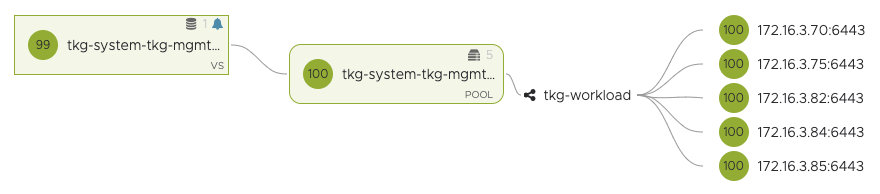
- You can also scale down
k get no
NAME                     STATUS   ROLES           AGE   VERSION
tkg-single-ngbmw-mm6tp   Ready    control-plane   18m   v1.25.7+vmware.2

- You can register single node clusters to TMC. This is possible as TKG changes the metadata for single node clusters as a workload cluster type. You can find this by looking at the config map for the tkg-metadata
k get cm -n tkg-system-public tkg-metadata -o yaml. Line 6 below.
apiVersion: v1
data:
  metadata.yaml: |
    cluster:
        name: tkg-single
        type: workload
        plan: dev
        kubernetesProvider: VMware Tanzu Kubernetes Grid
        tkgVersion: v2.2.0
        edition: tkg
        infrastructure:
            provider: vsphere
        isClusterClassBased: true
    bom:
        configmapRef:
            name: tkg-bom
kind: ConfigMap
metadata:
  creationTimestamp: "2023-05-29T14:47:14Z"
  name: tkg-metadata
  namespace: tkg-system-public
  resourceVersion: "250"
  uid: 944a120b-595c-4367-a570-db295af54d11
To deploy a single-node cluster, you can refer to the documentation here.
- In summary, switch to the TKG management cluster context and type this command to enable single-node clusters
tanzu config set features.cluster.single-node-clusters true - create a cluster config file as normal, and save the file as a yaml, for example tkg-single.yaml.
#! ---------------------------------------------------------------------
#! Basic cluster creation configuration
#! ---------------------------------------------------------------------

# CLUSTER_NAME:
ALLOW_LEGACY_CLUSTER: false
INFRASTRUCTURE_PROVIDER: vsphere
CLUSTER_PLAN: dev
NAMESPACE: default
# CLUSTER_API_SERVER_PORT: # For deployments without NSX Advanced Load Balancer
CNI: antrea
ENABLE_DEFAULT_STORAGE_CLASS: false

#! ---------------------------------------------------------------------
#! Node configuration
#! ---------------------------------------------------------------------

# SIZE:
#CONTROLPLANE_SIZE: small
#WORKER_SIZE: small

# VSPHERE_NUM_CPUS: 2
# VSPHERE_DISK_GIB: 40
# VSPHERE_MEM_MIB: 4096

VSPHERE_CONTROL_PLANE_NUM_CPUS: 4
VSPHERE_CONTROL_PLANE_DISK_GIB: 40
VSPHERE_CONTROL_PLANE_MEM_MIB: 8192
# VSPHERE_WORKER_NUM_CPUS: 2
# VSPHERE_WORKER_DISK_GIB: 40
# VSPHERE_WORKER_MEM_MIB: 4096

# CONTROL_PLANE_MACHINE_COUNT:
# WORKER_MACHINE_COUNT:
# WORKER_MACHINE_COUNT_0:
# WORKER_MACHINE_COUNT_1:
# WORKER_MACHINE_COUNT_2:

#! ---------------------------------------------------------------------
#! vSphere configuration
#! ---------------------------------------------------------------------

#VSPHERE_CLONE_MODE: "fullClone"
VSPHERE_NETWORK: tkg-workload
# VSPHERE_TEMPLATE:
# VSPHERE_TEMPLATE_MOID:
# IS_WINDOWS_WORKLOAD_CLUSTER: false
# VIP_NETWORK_INTERFACE: "eth0"
VSPHERE_SSH_AUTHORIZED_KEY: <-- snipped -->
VSPHERE_USERNAME: administrator@vsphere.local
VSPHERE_PASSWORD:
# VSPHERE_REGION:
# VSPHERE_ZONE:
# VSPHERE_AZ_0:
# VSPHERE_AZ_1:
# VSPHERE_AZ_2:
# USE_TOPOLOGY_CATEGORIES: false
VSPHERE_SERVER: vcenter.vmwire.com
VSPHERE_DATACENTER: home.local
VSPHERE_RESOURCE_POOL: tkg-vsphere-workload
VSPHERE_DATASTORE: lun01
VSPHERE_FOLDER: tkg-vsphere-workload
# VSPHERE_STORAGE_POLICY_ID
# VSPHERE_WORKER_PCI_DEVICES:
# VSPHERE_CONTROL_PLANE_PCI_DEVICES:
# VSPHERE_IGNORE_PCI_DEVICES_ALLOW_LIST:
VSPHERE_CONTROL_PLANE_CUSTOM_VMX_KEYS: 'ethernet0.ctxPerDev=3,ethernet0.pnicFeatures=4,sched.cpu.shares=high'
# VSPHERE_WORKER_CUSTOM_VMX_KEYS: 'ethernet0.ctxPerDev=3,ethernet0.pnicFeatures=4,sched.cpu.shares=high'
# WORKER_ROLLOUT_STRATEGY: "RollingUpdate"
# VSPHERE_CONTROL_PLANE_HARDWARE_VERSION:
# VSPHERE_WORKER_HARDWARE_VERSION:
VSPHERE_TLS_THUMBPRINT: <-- snipped -->
VSPHERE_INSECURE: false
# VSPHERE_CONTROL_PLANE_ENDPOINT: # Required for Kube-Vip
# VSPHERE_CONTROL_PLANE_ENDPOINT_PORT: 6443
# VSPHERE_ADDITIONAL_FQDN:
AVI_CONTROL_PLANE_HA_PROVIDER: true


#! ---------------------------------------------------------------------
#! Common configuration
#! ---------------------------------------------------------------------

ADDITIONAL_IMAGE_REGISTRY_1: "harbor.vmwire.com"
ADDITIONAL_IMAGE_REGISTRY_1_SKIP_TLS_VERIFY: false
ADDITIONAL_IMAGE_REGISTRY_1_CA_CERTIFICATE: <-- snipped -->


# TKG_CUSTOM_IMAGE_REPOSITORY: ""
# TKG_CUSTOM_IMAGE_REPOSITORY_SKIP_TLS_VERIFY: false
# TKG_CUSTOM_IMAGE_REPOSITORY_CA_CERTIFICATE: ""

# TKG_HTTP_PROXY: ""
# TKG_HTTPS_PROXY: ""
# TKG_NO_PROXY: ""
# TKG_PROXY_CA_CERT: ""

ENABLE_AUDIT_LOGGING: false

CLUSTER_CIDR: 100.96.0.0/11
SERVICE_CIDR: 100.64.0.0/13

# OS_NAME: ""
# OS_VERSION: ""
# OS_ARCH: ""

#! ---------------------------------------------------------------------
#! Autoscaler configuration
#! ---------------------------------------------------------------------

ENABLE_AUTOSCALER: false
Then use the –dry-run option and save the cluster object spec file with tanzu cluster create <name-of-new-cluster> -f tkg-single.yaml > tkg-single-spec.yaml --dry-run, this creates a new file called tkg-single-spec.yaml that you need to edit before creating the single node cluster.
Edit the tkg-single-spec.yaml file and change the following sections.
under spec.topology.variables, add the following:
- name: controlPlaneTaint
  value: false
under spec.topology.workers, delete the entire block including the workers section heading.
Your changed file should look like the example below.
apiVersion: csi.tanzu.vmware.com/v1alpha1
kind: VSphereCSIConfig
metadata:
  name: tkg-single
  namespace: default
spec:
  vsphereCSI:
    config:
      datacenter: /home.local
      httpProxy: ""
      httpsProxy: ""
      noProxy: ""
      region: null
      tlsThumbprint: <-- snipped -->
      useTopologyCategories: false
      zone: null
    mode: vsphereCSI
---
apiVersion: run.tanzu.vmware.com/v1alpha3
kind: ClusterBootstrap
metadata:
  annotations:
    tkg.tanzu.vmware.com/add-missing-fields-from-tkr: v1.25.7---vmware.2-tkg.1
  name: tkg-single
  namespace: default
spec:
  additionalPackages:
  - refName: metrics-server*
  - refName: secretgen-controller*
  - refName: pinniped*
  - refName: tkg-storageclass*
    valuesFrom:
      inline:
        infraProvider: ""
  csi:
    refName: vsphere-csi*
    valuesFrom:
      providerRef:
        apiGroup: csi.tanzu.vmware.com
        kind: VSphereCSIConfig
        name: tkg-single
  kapp:
    refName: kapp-controller*
---
apiVersion: v1
kind: Secret
metadata:
  name: tkg-single
  namespace: default
stringData:
  password:
  username: administrator@vsphere.local
---
apiVersion: cluster.x-k8s.io/v1beta1
kind: Cluster
metadata:
  annotations:
    osInfo: ubuntu,20.04,amd64
    tkg/plan: dev
  labels:
    tkg.tanzu.vmware.com/cluster-name: tkg-single
  name: tkg-single
  namespace: default
spec:
  clusterNetwork:
    pods:
      cidrBlocks:
      - 100.96.0.0/11
    services:
      cidrBlocks:
      - 100.64.0.0/13
  topology:
    class: tkg-vsphere-default-v1.0.0
    controlPlane:
      metadata:
        annotations:
          run.tanzu.vmware.com/resolve-os-image: image-type=ova,os-name=ubuntu
      replicas: 1
    variables:
    - name: controlPlaneTaint
      value: false
    - name: cni
      value: antrea
    - name: controlPlaneCertificateRotation
      value:
        activate: true
        daysBefore: 90
    - name: additionalImageRegistries
      value:
      - caCert: <-- snipped -->
        host: harbor.vmwire.com
        skipTlsVerify: false
    - name: auditLogging
      value:
        enabled: false
    - name: podSecurityStandard
      value:
        audit: baseline
        deactivated: false
        warn: baseline
    - name: aviAPIServerHAProvider
      value: true
    - name: vcenter
      value:
        cloneMode: fullClone
        datacenter: /home.local
        datastore: /home.local/datastore/lun01
        folder: /home.local/vm/tkg-vsphere-workload
        network: /home.local/network/tkg-workload
        resourcePool: /home.local/host/cluster/Resources/tkg-vsphere-workload
        server: vcenter.vmwire.com
        storagePolicyID: ""
        template: /home.local/vm/Templates/ubuntu-2004-efi-kube-v1.25.7+vmware.2
        tlsThumbprint: <-- snipped -->
    - name: user
      value:
        sshAuthorizedKeys:
        - <-- snipped -->
    - name: controlPlane
      value:
        machine:
          customVMXKeys:
            ethernet0.ctxPerDev: "3"
            ethernet0.pnicFeatures: "4"
            sched.cpu.shares: high
          diskGiB: 40
          memoryMiB: 8192
          numCPUs: 4
    - name: worker
      value:
        count: 1
        machine:
          diskGiB: 40
          memoryMiB: 4096
          numCPUs: 2
    version: v1.25.7+vmware.2-tkg.1

 VMwire
One thought on “Single node clusters with TKG”